


Blueprint MCAT Study Planner Review
by Blueprint
The study plan built into Blueprint's MCAT platform, free for 14 days
✓Pros
- ✓Takes your test date and the days you choose to study or rest and returns a dated calendar, not a blank grid
- ✓Sequencing is deliberate interleaving: 1 to 2 hour sessions spread across several days instead of one long block per subject
- ✓Resetting redistributes everything you have not finished across the time you have left and keeps your Qbank progress, exam scores and module completion
- ✓Custom assignments take a title, a link, a duration and a date, so material Blueprint did not sell you can sit on the same calendar
- ✓One subscription URL puts the plan into Google Calendar, Apple Calendar or Outlook
✗Cons
- ✗Free for 14 days only, and the cheapest product that names the personalized study plan is the $1,199 Self-Paced Course
- ✗Nothing from the AAMC is scheduled for you: every official full length or question pack goes in by hand as a custom assignment
- ✗Moving your exam date earlier forces a full reset, and a reset cannot be undone
- ✗Days off after the plan exists are manual, by dragging assignments or editing each date
Highlights
- ✓A dated calendar built around your MCAT test date
- ✓Blueprint learning modules, Qbank sets and practice exams scheduled as assignments
- ✓Custom assignments in five types: General, Read, Watch, To Do and Other
- ✓Reset and rebalance controls that redistribute unfinished work
- ✓A read-only calendar subscription for Google Calendar, Apple Calendar and Outlook
Price
$1,199 - $3,599
What Students Are Saying
Sign in to leave a review

Expert Rating
Blueprint's MCAT study planner is real scheduling software, not a printable grid: you give it your test date and the days you are willing to study, and it lays Blueprint's modules, question sets and practice exams across your calendar. It is free for 14 days with no credit card, and after that it only exists inside a Blueprint product, the cheapest of which starts at $1,199.
That makes it worth the trial for almost any MCAT student and worth buying for almost none on its own. This review is about what the planner actually does with your calendar, taken from Blueprint's own support documentation rather than its marketing copy.
Summary Table
| Feature | Blueprint MCAT Study Planner |
|---|---|
| Price | Free for 14 days, then $1,199 to $3,599 depending on the product |
| Format | Web app inside the Blueprint MCAT platform |
| What it schedules | Blueprint learning modules, Qbank sets, practice exams, custom assignments |
| Plan length | Bounded by your access period: 3 or 6 months on Self-Paced, 6 or 12 on the live courses |
| Sequencing | Interleaved, in 1 to 2 hour sessions rather than single-subject blocks |
| Rescheduling | Reset redistributes unfinished work, drag and drop moves single assignments |
| Outside material | Custom assignments only, with a title, link, duration and date |
| Calendar sync | Read-only subscription for Google Calendar, Apple Calendar, Outlook |
| Guarantee | None on the planner itself |
| Our rating | 3.9 out of 5 |
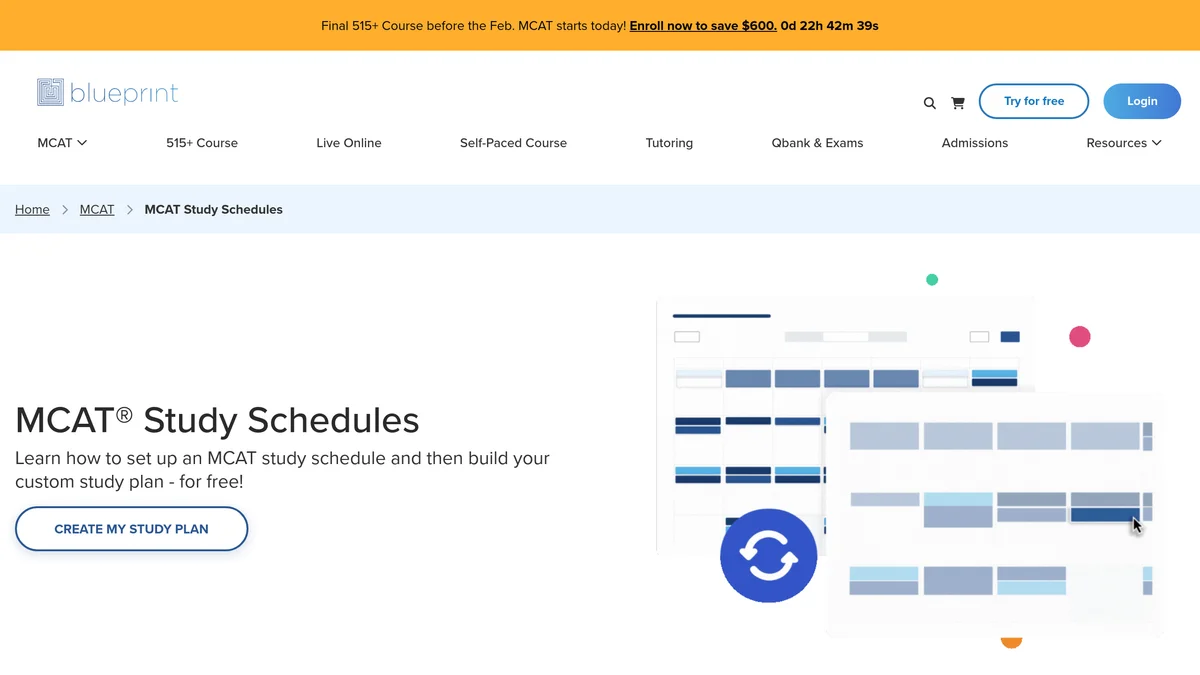 The study schedules page on blueprintprep.com, captured October 2026. The button goes to trial signup, not to the planner.
Blueprint MCAT study planner overview
Blueprint is the company behind our reviews of the self-paced course, the practice tests, the Qbank and the flashcards. The planner is the scheduling layer that ties those together, and Blueprint describes it on its study schedules page as a tool that "generates a study plan for them based on when their MCAT test date is and what days they want to study or rest".
That is the whole premise, and it is a meaningful one. Most things marketed as MCAT study planners are blank calendars or PDFs with suggested weeks. This one holds a dated assignment list that knows what you have finished.
What you get once a plan exists:
- A calendar running from your start date to your exam date, with assignments on specific days.
- Blueprint's own learning modules, Qbank practice sets and full-length exams placed on those days.
- Custom assignments for anything Blueprint did not write, each with a type, a title, a link, an estimated duration and a date.
- Reset and rebalance controls that redistribute whatever you have not finished.
- A subscription link that mirrors the plan into Google Calendar, Apple Calendar or Outlook.
Blueprint's own guidance on the same page is that most MCAT study schedules run 12 to 20 weeks and that a typical student takes 7 to 8 full lengths, roughly one a week. Those are the shapes the planner produces.
Blueprint MCAT study planner review for 2026
What it builds, and how long the plan can run
The planner does not ask how many weeks you want. It asks for your exam date, your course schedule if you have one, and your rest days, then fills the span between now and the test.
The practical ceiling is not the planner, it is what you bought. Self-Paced access runs 3 or 6 months, the live courses 6 or 12. If your plan reaches its end before your exam date, Blueprint's support article on resetting your study plan tells you to buy an extension in your account, after which the time is added immediately and you are advised to reset again so the work spreads properly. Students on a 10 month runway should price that in before they start.
The sequencing is the part worth knowing about. Blueprint has written down why your plan looks the way it does: it interleaves on purpose, splitting what might be six hours on one topic into 1 to 2 hour sessions across several days, on the view that mixing topics beats blocking them. You can disagree with that choice, but it is a stated choice with a reason attached, which is more than any printable MCAT schedule offers.
What it re-plans for you when the week goes wrong
This is the question that separates planning software from a calendar, and the answer is split.
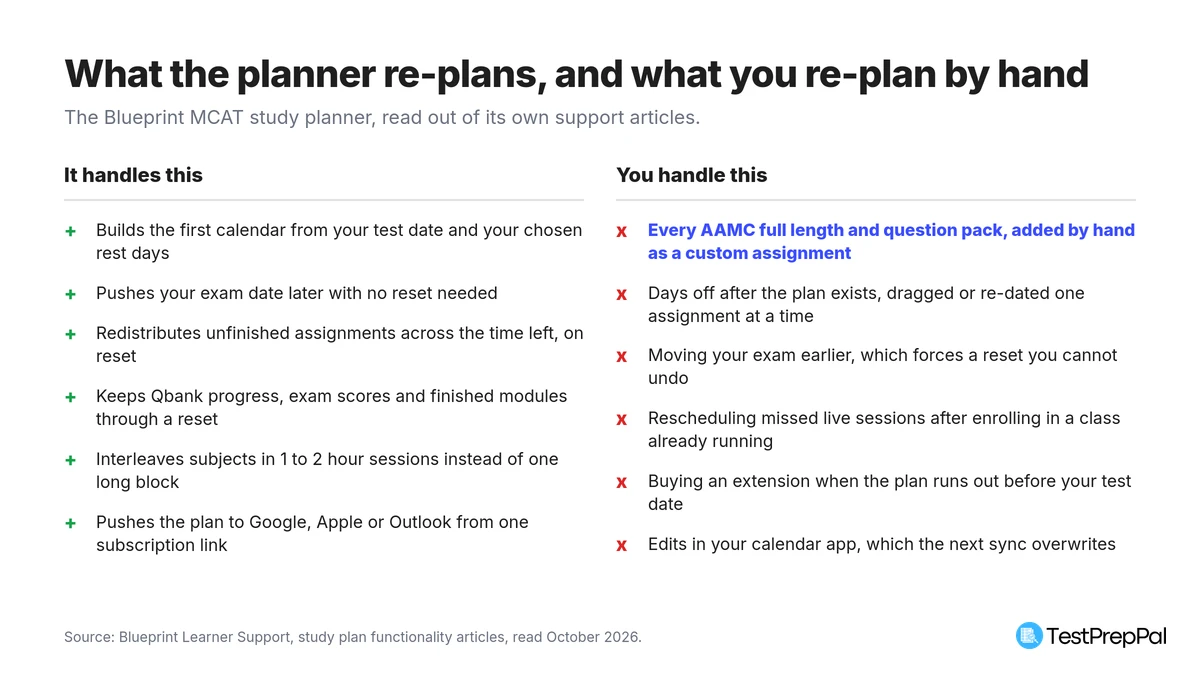 Compiled from Blueprint's study plan support articles, read October 2026.
Reset is the real re-planning tool. According to the same support article, it rearranges your schedule without erasing progress: Qbank item progress, exam scores and analytics, and module completion all survive, and anything you had marked incomplete reappears in the new plan. Completed assignments drop off the calendar, which is why a plan can look thinner after a reset than before it. The warning Blueprint prints is the one to take seriously: once you confirm, the previous version of the plan is gone and cannot be brought back.
Moving your test date is handled asymmetrically, and Blueprint says so plainly in its article on adjusting your exam date. Pushing the exam later works from the calendar or the dashboard with no reset at all, though past about two months out Blueprint recommends one anyway so the work redistributes. Pulling the exam earlier requires a reset. There is no in-between.
Below that, everything is manual. Blueprint's article on adding days off describes exactly two methods: drag assignments off the day, or open each one and change its scheduled date. A week lost to illness is a week of dragging, or a reset that wipes your current layout.
What it will not schedule: anything AAMC
The planner's assignment bank is Blueprint's own catalogue. Modules, Qbank sets and Blueprint practice exams go on your calendar automatically because Blueprint knows what they are and how long they take.
Nothing from the AAMC does. Official full lengths, the Section Banks, the Question Packs: none of it is scheduled for you. Blueprint's answer is the custom assignment, a blank item with five types to pick from (General, Read, Watch, To Do and Other), plus a title, a link, an estimated duration that counts toward your daily total, a date and a description. It is a good feature, and it is more than most planners allow. It is also entirely your labour: every official practice exam you intend to sit is a card you create by hand.
That matters most at the end of prep. Blueprint's own study schedules page tells you to save the AAMC full lengths for the last few weeks because they are the best estimate of your real score, yet the planner does nothing to place them, and the AAMC question bank material sits outside it in the same way. Advice the software does not enforce is advice you have to schedule yourself.
The calendar subscription has a related limit. Blueprint's calendar integration article is explicit that the feed is read-only: anything you move in Google Calendar, Apple Calendar or Outlook is overwritten at the next sync. The plan can leave Blueprint, but changes cannot come back in.
Pricing
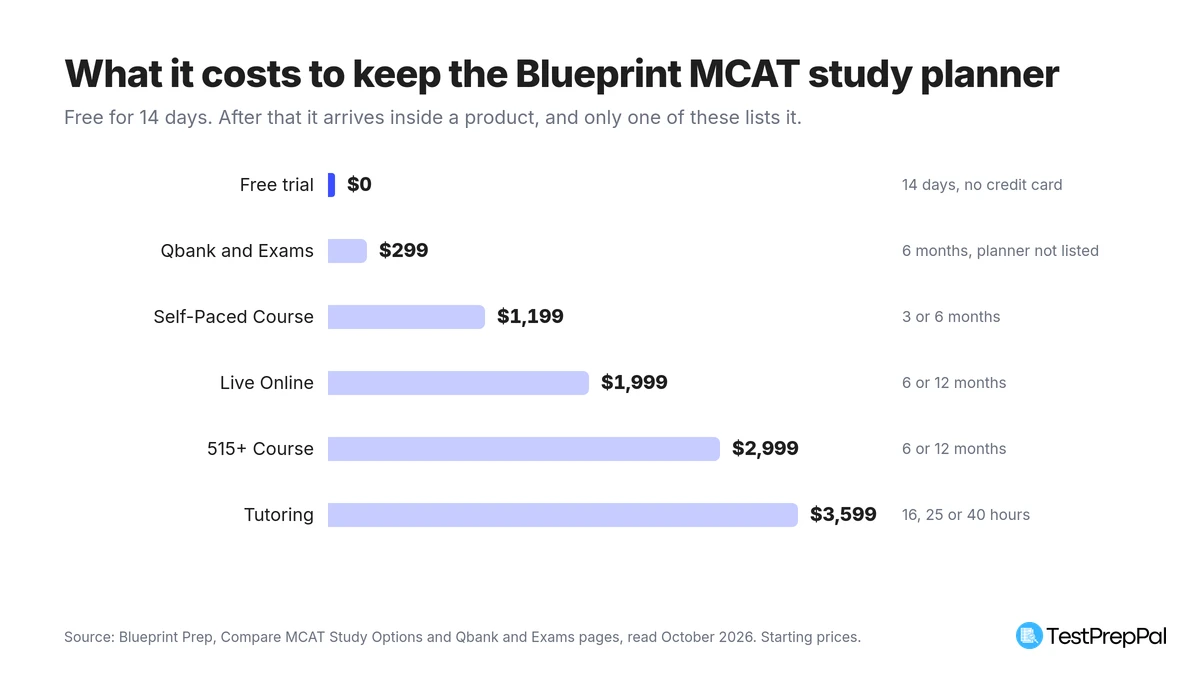 Starting prices from Blueprint's compare and Qbank pages, read October 2026.
The planner is not sold on its own, so its price is the price of the cheapest thing that carries it.
- Free trial: 14 days, no credit card. Blueprint's free account page lists a "start-to-finish study plan" among what the trial includes, and the free resources page sells that account as a 14 day trial.
- Self-Paced Course: from $1,199 for 3 or 6 months. The compare page attributes the personalized study plan to this course and values the course at $1,199, and every larger product bundles it.
- Live Online: $1,999 for 6 or 12 months. 515+ Course: $2,999. Tutoring: from $3,599 for 16, 25 or 40 hours, with Self-Paced access alongside.
One line deserves a flag. Blueprint's Qbank and exams page, at $99 a month or $299 for six months, mentions a study planner in its prose but does not list one among the seven things it itemizes as included. If the planner is the reason you are buying, the $299 tier is not the tier to buy on that promise.
Worth noting too: the study schedules page still carries an older module promising access "free for you to try forever", while the button beside it and every other page now say 14 days. Plan on 14.
Who the Blueprint MCAT study planner is best for
- Students already buying a Blueprint course. The planner is the best reason to use the platform as a platform rather than as a question bank, and you are paying for it either way.
- Anyone who wants to see what a sequenced plan looks like. Fourteen free days is enough to generate a full plan, read how it orders subjects, and copy the shape into your own calendar.
- Students who fall behind in bursts rather than steadily. Reset is genuinely good at absorbing a bad fortnight, and it costs you nothing you have already finished.
- People who live in a calendar app. The subscription link puts the whole plan in front of you without opening Blueprint.
When you might look elsewhere
- You want a planner, not a course. Our free MCAT study plan generator builds a week-by-week calendar around your test date with no account and no expiry, and our MCAT study schedule guide gives the 12, 8 and 4 week versions in full.
- Your prep is built on AAMC material. Everything official goes in by hand here. If the AAMC full lengths and Section Banks are your spine, a planner that cannot schedule them is working against you.
- You need a plan longer than your access. Six months of Self-Paced access caps a six month plan. A ten month runway means an extension on top of the course price.
- You only wanted the free parts. Blueprint's free half-length diagnostic and its flashcards are the pieces that survive without a purchase decision.
Final verdict
As software, this is the strongest study planner we have reviewed. It generates rather than templates, it recovers from a bad week without punishing you for the good ones, it tells you why it ordered your subjects the way it did, and it leaves through a calendar feed instead of trapping you in a dashboard. Judged as a tool, 4.5 would be fair.
Judged as a product a student can buy, it is not really a product. Fourteen days, then $1,199 for the cheapest thing that names it. The gap between those two judgements is the whole review, and it is where the 3.9 comes from. Our review methodology explains how we weigh that kind of split.
If you are deciding between Blueprint products, start with the MCAT hub or compare what we have written on the MCAT study planners we have checked. The Blueprint free trial is the only way to see the planner itself before paying.
Blueprint MCAT study planner FAQs
Is the Blueprint MCAT study planner free?
It is free for 14 days with a Blueprint account and no credit card. Blueprint's free resources page sells that account as a 14 day trial, and the study plan is listed among what the trial includes. After the trial the planner comes with a Blueprint product, starting at $1,199 for the Self-Paced Course.
Does the Blueprint planner reschedule assignments if I fall behind?
Partly. Resetting your plan redistributes everything you have not finished across the time you have left, and it keeps your Qbank progress, exam scores and completed modules. Day to day slippage is manual: you drag assignments to new days or edit each assignment's scheduled date. A reset cannot be undone once confirmed.
Can the Blueprint planner schedule AAMC practice material?
Not on its own. The planner schedules Blueprint's modules, Qbank sets and practice exams automatically, and anything else goes in as a custom assignment that you create with a title, a link, a duration and a date. Every AAMC full length or question pack you plan to use is a card you add yourself.
Can I move my MCAT date after the plan is built?
Yes, and the direction matters. Moving your exam to a later date works from the study plan or the dashboard with no reset, though Blueprint recommends a reset if you move more than about two months out. Moving your exam earlier requires a full reset of the plan.
Does the Blueprint study plan sync with Google Calendar?
Yes, through a subscription URL from the Add to Calendar button, and it works with Apple Calendar and Outlook too. The feed is read-only: changes you make inside your calendar app are overwritten the next time the plan syncs, so all edits have to happen in Blueprint.
We may earn commissions from some links on this page, but this does not affect our reviews or your experience.
Our Verdict
The most capable study planner we have reviewed, and the one with the shortest free window. It takes a test date and a set of rest days and returns a real calendar, it re-sequences unfinished work when you reset, and its logic is documented rather than implied. The catch is that it schedules Blueprint's own material and nobody else's, and after 14 days keeping it means buying a product that starts at $1,199.